
Build a force with a purpose
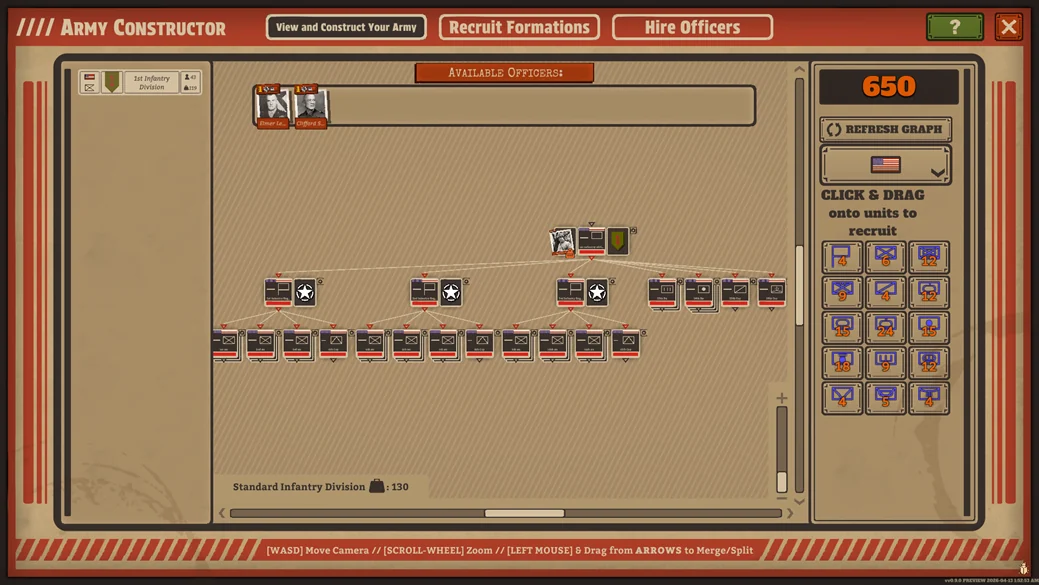
Build around the mission weight limit and battlefield jobs. Keep a complete command chain, useful regimental groups and support for the force you can actually deploy.
Build a force around the work it must perform, not around the largest roster you can afford. Battleplan's Army Constructor connects purchases, mission logistical weight and the organisation you will command on the map. A good change solves a problem you can name before deployment.
Weight and Requisition answer different questions
The published constructor uses Requisition for changes and a logistical-weight limit for the force a mission allows. The initial infantry division is described as free before the first tutorial. Completion rewards and campaign unlocks broaden later options. Buying another formation does not mean every mission can deploy it.
Check the mission limit before designing a purchase-heavy force. Then inspect the weight of the formation you intend to use. The constructor diary illustrates weight at the formation level; it does not establish one ideal purchase sequence for every mission.
Give each part of the force a job
Begin with the mission's demands. Do you need a force to hold ground, a force to make the main advance or an element that can react to a threat? Name those jobs before changing company counts. This helps you compare a useful support addition with another purchase that looks strong but has no place in the operation.
For a learning army, keep the job list short. You can then review a battle and ask which job was under-supported. If a position collapsed, adding more attack strength elsewhere may not address the problem. If an advance ran out of support, expanding the holding force may not address it either. A specific diagnosis makes the next constructor decision more meaningful.
Organisation affects the orders you will give
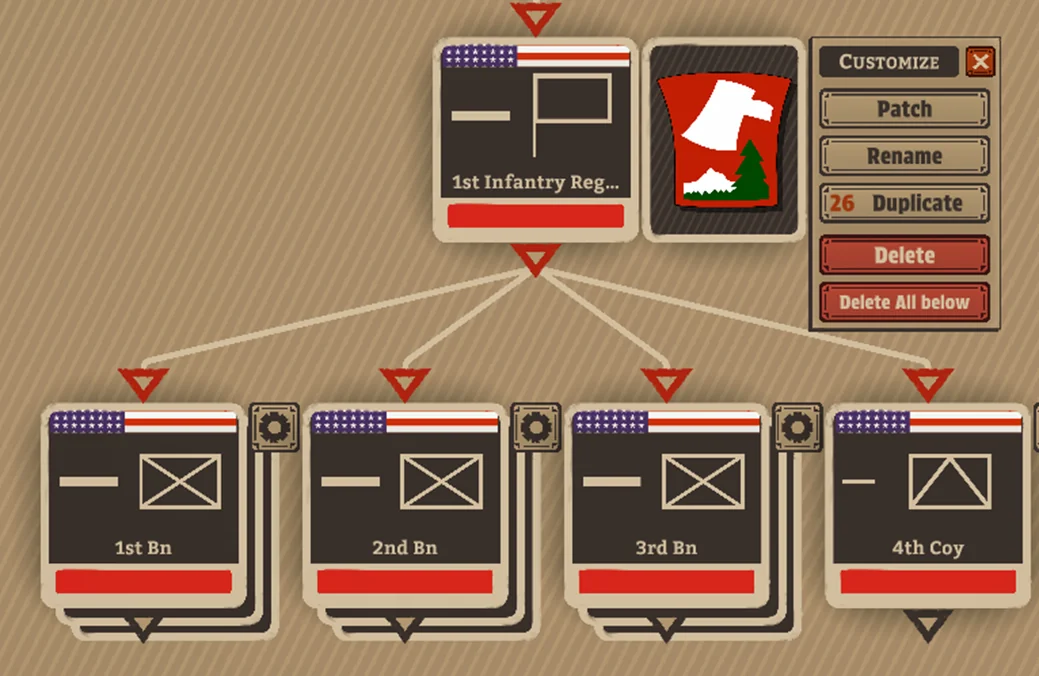
The developer shows changing companies and rearranging the command chain through the constructor's connections. Regimental organisation is relevant to the default regimental zone plan. Before moving units between groups, ask which formation will own the task you intend to issue on the map.
Imagine two intended jobs: holding an approach and taking the main objective. An organisation that forces you to separate the same mixed group repeatedly may be awkward to command. Try grouping around the tasks you expect to use, then inspect the result rather than assuming that an aesthetically symmetrical tree is operationally useful. This is an organisational exercise, not a prescribed division template.
Inspect support before buying another frontline unit
Review the force as a collection of capabilities. Ask how it will locate opposition, deal with prepared ground, protect a route and support contact. An additional frontline company may be valuable, but it should compete with a clearly identified support need rather than win by default.
| Decision | Question before making it |
|---|---|
| Add a company | Which battlefield job lacks enough support? |
| Add a formation | Can the mission deploy its weight, and who will command it? |
| Rearrange a regiment | Will this make the planned orders easier to allocate? |
| Remove a supporting role | What will now perform its job? |
| Spend on an officer | Does the skill fit the force and task beneath that HQ? |
Keep a note of the intended benefit. After deployment, look for that benefit specifically. Otherwise, a successful battle can lead you to credit a purchase that did not actually address the earlier problem.
Match officers to responsibilities
The officer diary describes skills affecting subordinate formations, passive and active abilities, and recruitment costs linked to experience. Read the actual skill and personality descriptions before assigning leadership. A role-specific benefit deserves a role-specific placement; a costlier officer is not automatically the best fit for every headquarters.
An active ability also deserves a plan for when it will matter. Do not select leadership solely because a description sounds powerful if you cannot identify the point in the operation at which you intend to use it. The officer diary also explains leadership losses. Protect headquarters as part of the operation rather than treating officers as detached upgrade cards.
Run a final deployment check
Before leaving the constructor, check the complete command chain and officer assignments, mission weight, intended regimental jobs and available support. Then compare the selected army with the first phase of your plan. If you need to explain a purchase with an unrelated future scenario, it may be better to defer that decision until the scenario arrives.
For your first learning attempt, avoid rebuilding everything after one confusing battle. Identify a concrete weakness, change the part of the roster connected to it and compare the next result. Changes in mission, orders and army composition at the same time make it harder to understand what helped.
Use combined arms to plan how support will contribute during contact, and zone orders to check how your regimental structure becomes a battlefield allocation. Return to Your first battle when the main problem is the plan rather than the roster.